Chat with AI
Works with five providers:
- Local (Ollama) — private and unlimited, downloaded automatically.
- Google Gemini — free API key.
- OpenRouter — free-tier models.
- Groq — fast free models.
- OpenAI — ChatGPT models (gpt-5), pay as you go.
The AI assistant that lives on your Mac and does things for you.
Agentic is a native macOS app that combines a chat assistant with real control of your computer. Ask it questions, and it will search the web, read and write files, run commands, open apps, and even see and click your screen — all while telling you what it is doing. It works with free AI models, is fully usable with VoiceOver, and plays a sound and sends a notification when your answer is ready.
First launch: macOS shows a security warning because the app is not notarized yet — choose Open. More in the FAQ.
A real Agentic conversation — it delegates research to a subagent, then operates your apps and screen for you.
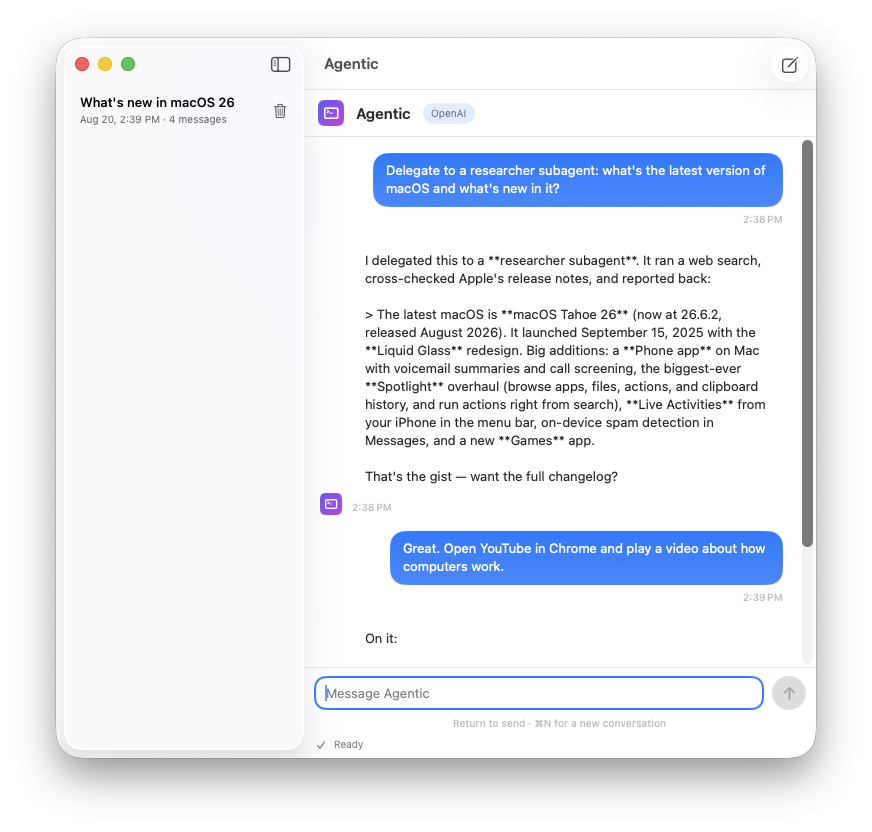
One app, 32 built-in tools. Here is everything Agentic can do, grouped by area.
Works with five providers:
Run real shell commands and see the output, so you can install software, manage files, and automate almost anything. Destructive commands ask for your approval first.
run_shell_command — run a terminal commandget_current_datetime — the current date and timecalculate — instant arithmeticRead, write, and edit files, and search your computer:
list_directory · read_file · write_file · edit_filegrep_search — search inside file contentsglob_find — find files by name patternSearch the web and read pages, or open them directly:
web_search — live web search with summariesweb_fetch — read the text of any pageopen_url — open a website in your browserAgentic can actually look at your Mac and operate it for you:
capture_screen — see what is on screen, with click coordinatesclick_at · mouse_double_click · mouse_right_clickmouse_drag · mouse_scroll · mouse_movetype_text · paste_text · press_key (with shortcuts like command+v)open_application · activate_app · get_frontmost_appclipboard_read · clipboard_set"Remind me in 10 minutes to stretch." Agentic schedules it for you — it fires with a sound, a notification, and a spoken announcement even if you never enabled notifications.
set_reminder · list_reminders · cancel_reminderFor big jobs, Agentic delegates to focused subagents — a researcher, an implementer, or a verifier — then combines their reports into one answer.
Every chat is saved automatically, listed in a sidebar and in the menu-bar Conversations menu, with titles created from your first message. Reopen anything later.
Every action, approval, and status is announced out loud. A custom sound plays when your answer is ready, and errors play a different tone. Long chats are trimmed automatically so answers stay fast.
Step-by-step install guide, the AI providers you can connect, how permissions work, and answers to common questions.
Yes. The default provider runs a model on your own Mac (Ollama), which costs nothing. The cloud providers offer free API tiers; paste a free key in Settings if you prefer one of them. OpenAI is also supported and is billed per token.
Agentic needs macOS 14 or later and an Apple Silicon Mac (M1 or newer) — Intel Macs are not supported. It was built and tested on macOS 26.
Agentic is not notarized by Apple yet, so macOS can't verify its developer when you first open it. It's safe: the app is open source and signed, and your messages stay on your Mac unless you use a cloud provider. To open it, right-click (or Control-click) the app and choose Open, then confirm. You only do this once.
Yes — VoiceOver support is a core feature. Every step, approval, error, and finished response is announced, buttons and lists have clear labels, and the app plays its own sounds so you know when something happens.
With the local model, your conversation never leaves your Mac. With a cloud provider, your messages are sent to that provider under their privacy policy. Conversations are saved on your Mac in Application Support and can be deleted anytime. See the privacy page for the full picture.
Download Agentic for macOS, grant permissions once, and start talking to your Mac.
Download AgenticFirst launch: macOS shows a security warning because the app is not notarized yet — right-click the app, choose Open, then confirm. You only do this once.